
Dr. Christopher Kunz
christopherkunz@chaos.social
May 11, 2026: The Red Sun still prevails.
However, I noticed something odd. Either this is purely coincidence, or the exploit has less reliability now (?). On a freshly booted system, it works 100%, but after a couple minutes of runtime, it seems that it doesn't always win the race condition (or it takes longer than the usual ~10 seconds).
 1
1
 0
0
 0
0

Jan Hendrik
jhr77@mastodon.social@christopherkunz maybe it's linked to system load or a half-working patch from MS...
It will be interesting to try out. If I find the time to set-up a VM or are you trying on a physical computer?
br
1
0
0

Will Dormann
wdormann@infosec.exchange@jhr77 @christopherkunz
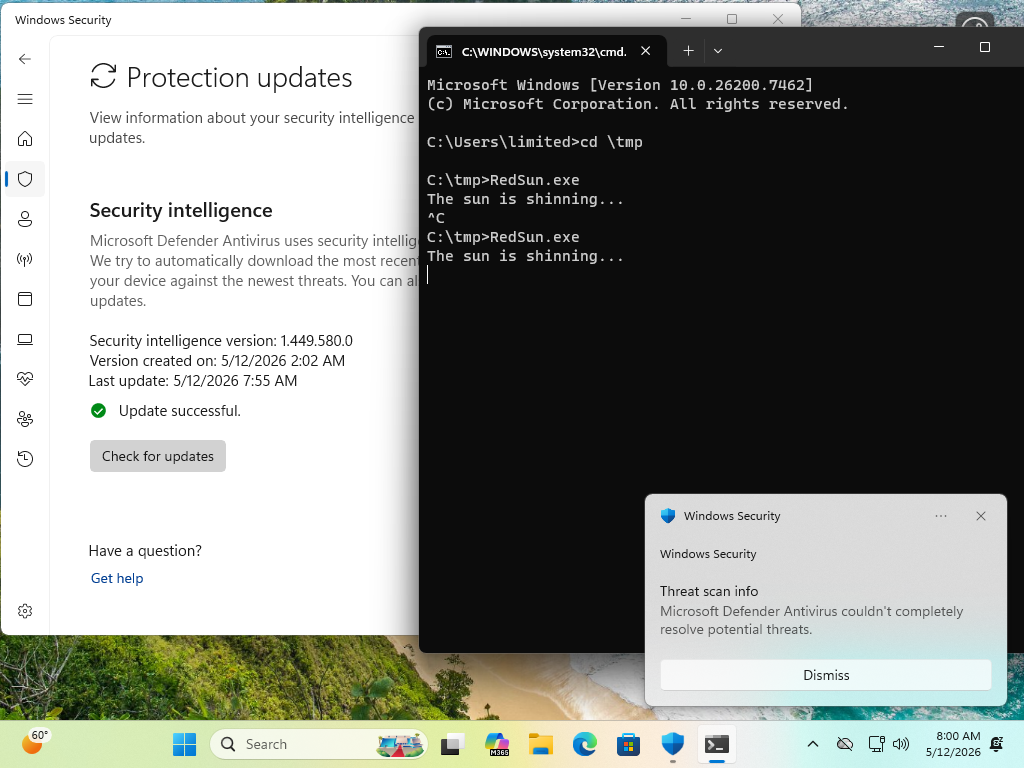
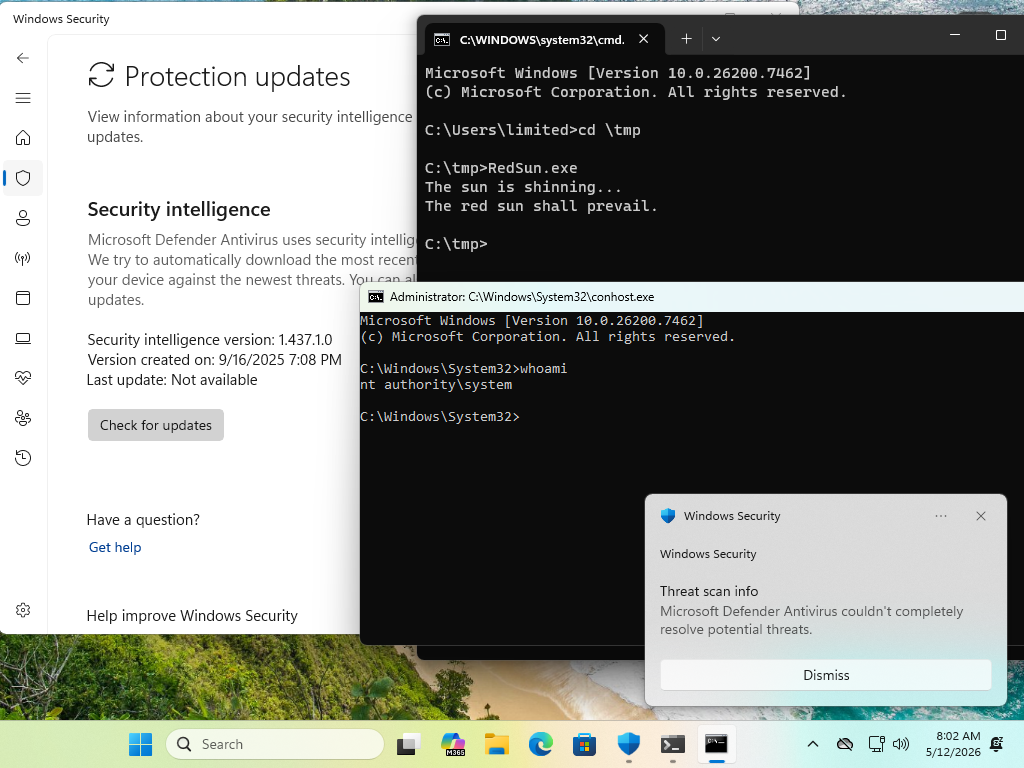
I suspect that Microsoft pushed out Defender updates that mitigate the exploit.
With current definitions, I've not seen RedSun succeed. No matter how long I wait.
With old definitions, success is pretty quick.
 2
2
0
2
2
0
Dr. Christopher Kunz
christopherkunz@chaos.social 0
0
0
0
0
0
Will Dormann
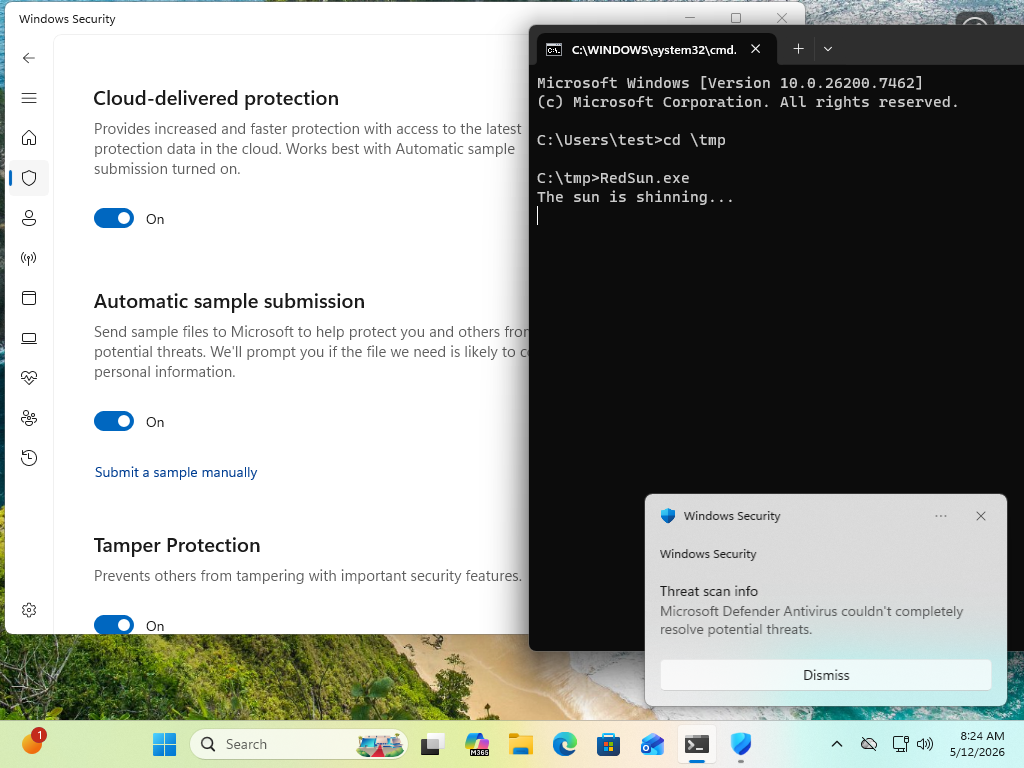
wdormann@infosec.exchange@GossiTheDog @christopherkunz @jhr77 Cloud-delivered protection ?
If so, then yeah, it's on.
It's the same stock Win11 VM that worked in April. Just with Defender updates installed.
 1
0
0
1
0
0
Dr. Christopher Kunz
christopherkunz@chaos.social@GossiTheDog @wdormann @jhr77 Yes, cloud protection is on. This is a German Win11 Home, I think. After updating to today's definitions and a reboot, RedSun.exe doesn't seem to win the RC anymore, so the reboot was likely necessary to apply the Defender mitigation.
I don't think this is merely a signature update, from what I understood the mitigation requires a core update to Defender.
1
0
0
Will Dormann
wdormann@infosec.exchange@christopherkunz @GossiTheDog @jhr77
The executable bits for Defender are updated along with sigs.
1
0
0
Dr. Christopher Kunz
christopherkunz@chaos.social@wdormann @GossiTheDog @jhr77 On second attempt, the exploit worked. So whatever MS did, is still not a 100% mitigation. I''ll try again to reproduce what happened.
1
0
0
Will Dormann
wdormann@infosec.exchange@christopherkunz @GossiTheDog @jhr77
When it succeeds, does it happen relatively quickly?
I've tried both waiting 10 minutes and have also tried 10 times in a row, and neither strategy is successful on my Win11 VM.
0
0
0
Dr. Christopher Kunz
christopherkunz@chaos.social@wdormann @GossiTheDog @jhr77 Reboot, log in, win-r, cmd, cd \temp, RedSun.exe, worked on first attempt.
In my last attempt, I had opened the Defender warning popup "defender has found a threat" and I thought I'd triggered some condition for the exploit to work. Seems not, I can still run it.
It succeeds after about 10 seconds.
1
0
0
Will Dormann
wdormann@infosec.exchange@christopherkunz @GossiTheDog @jhr77
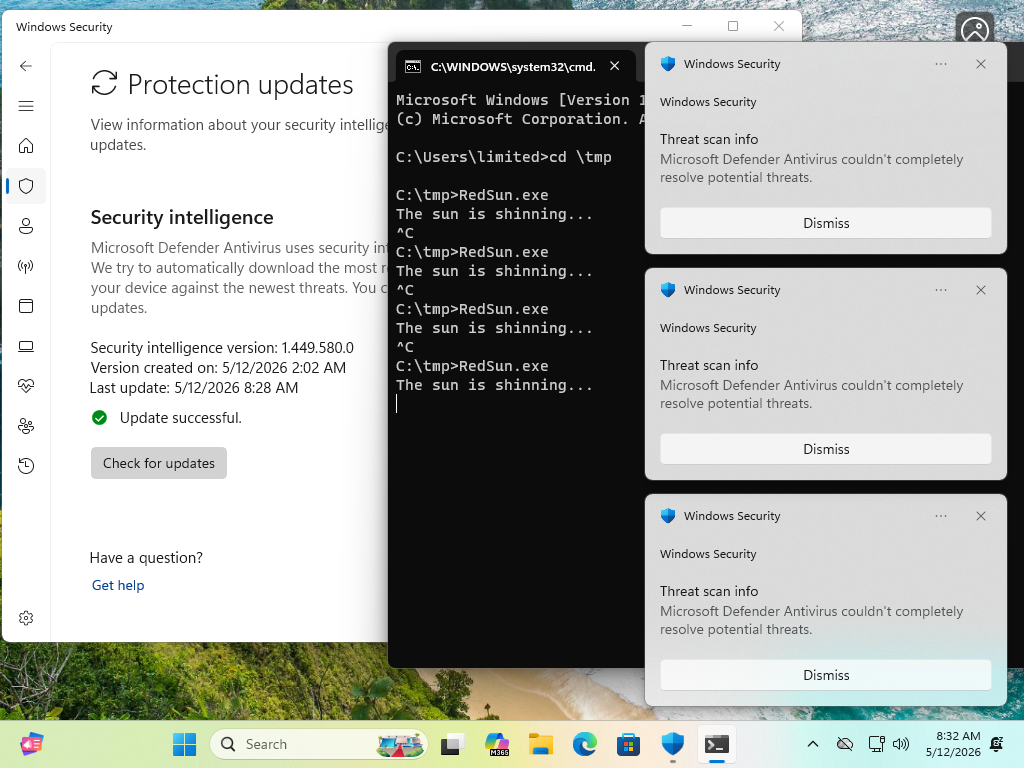
The dialog is the detection of the EICAR TieringEngineService.exe and is definitely a part of the successful exploit flow.
It's just that at least for me, it never succeeds with updated defs. 🤷♂️
 1
0
0
1
0
0
Dr. Christopher Kunz
christopherkunz@chaos.social@wdormann @GossiTheDog @jhr77 I think my TieringEngineService.exe might be permanently patched/replaced with the RedSun copy and none of the definitions updates have cleaned it up.
1
0
0
Will Dormann
wdormann@infosec.exchange@christopherkunz @GossiTheDog @jhr77
Well yep, if you're testing on an already-popped machine, that's an invalid test.
That is, if C:\Windows\system32\TieringEngineService.exe has already been replaced, then the exploit might appear to "work" even when it doesn't.
TieringEngineService.exe is a Windows component. It has nothing to do with Defender, and no Defender update will restore it to its pristine state.
1
0
0
Will Dormann
wdormann@infosec.exchange@christopherkunz @GossiTheDog @jhr77
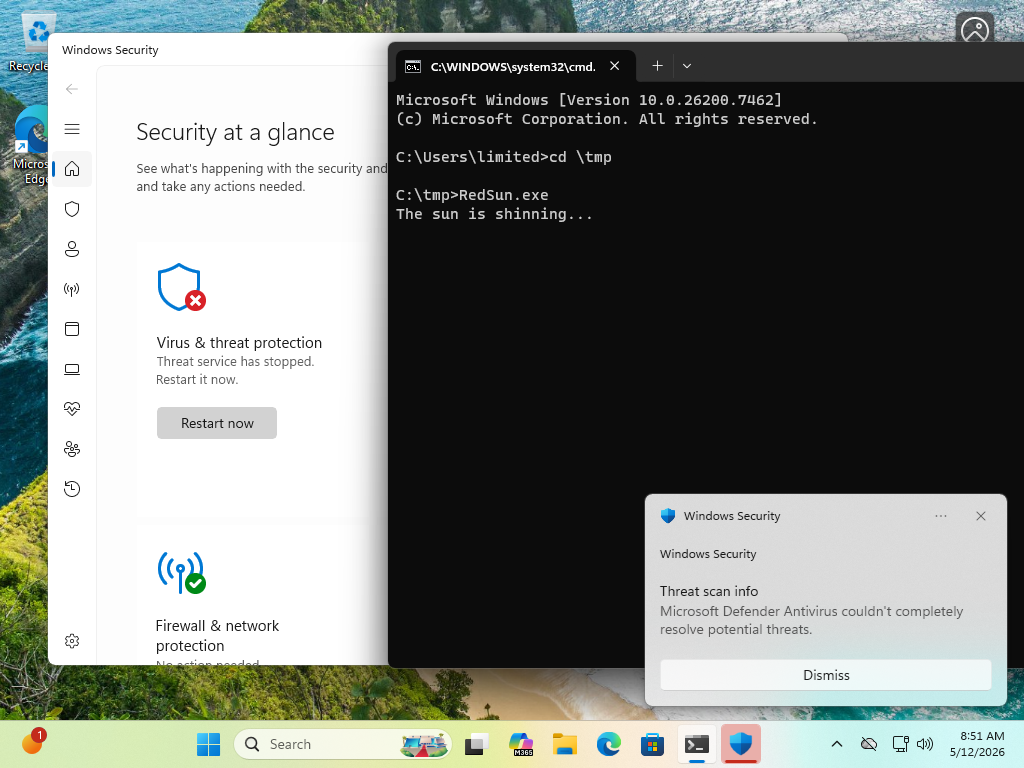
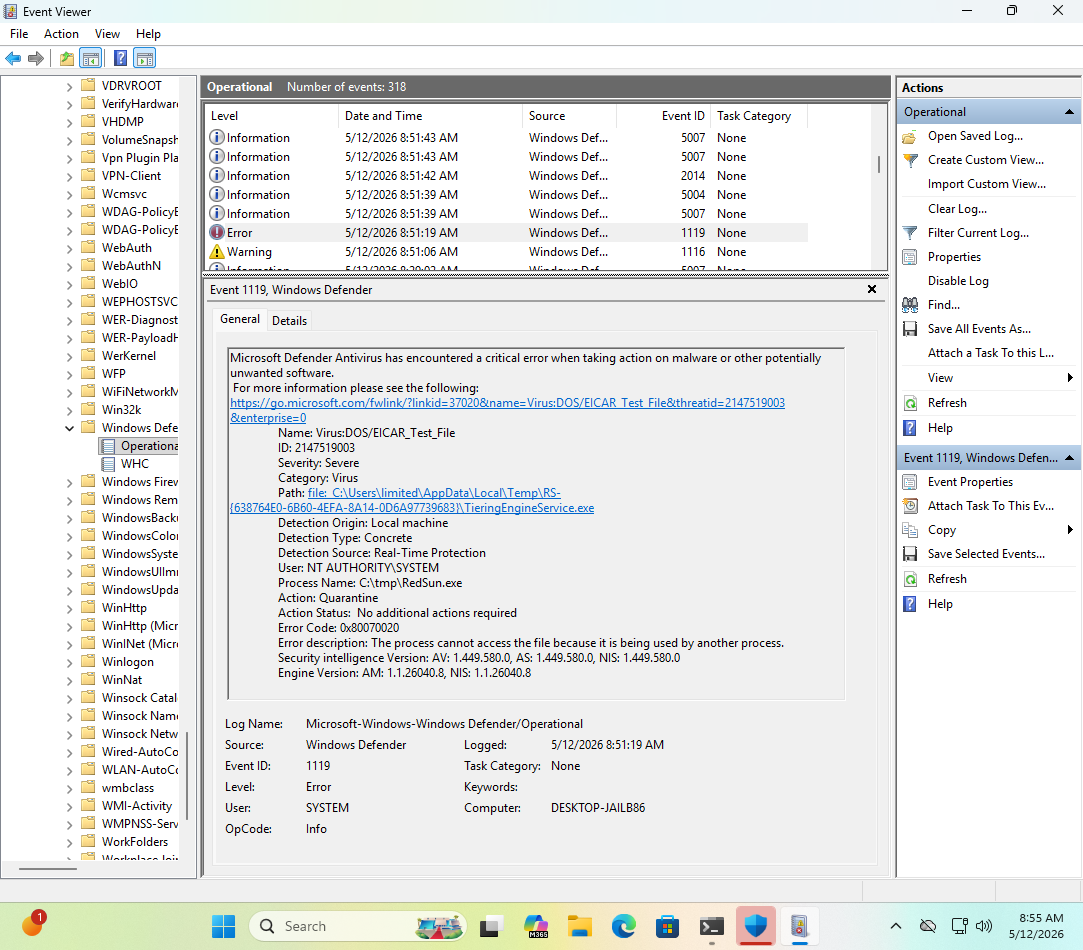
Though I'll also admit that having Windows Security open seems to indicate that Windows Defender stops when RedSun is attempted.
From the GUI it's merely Threat service has stopped, but in Event viewer we can get more info in that it's Microsoft Defender Antivirus has encountered a critical error when taking action on malware or other potentially unwanted software.
It restarts automatically.
If this is an intentional RedSun fix, I'll say that it's less than ideal. 😂
 1
0
0
1
0
0
Jan Hendrik
jhr77@mastodon.social@wdormann @christopherkunz @GossiTheDog Hi, today at the first try I had a shell with system rights. So i assume that it worked successfully.
1
0
0
Will Dormann
wdormann@infosec.exchange@jhr77 @christopherkunz @GossiTheDog
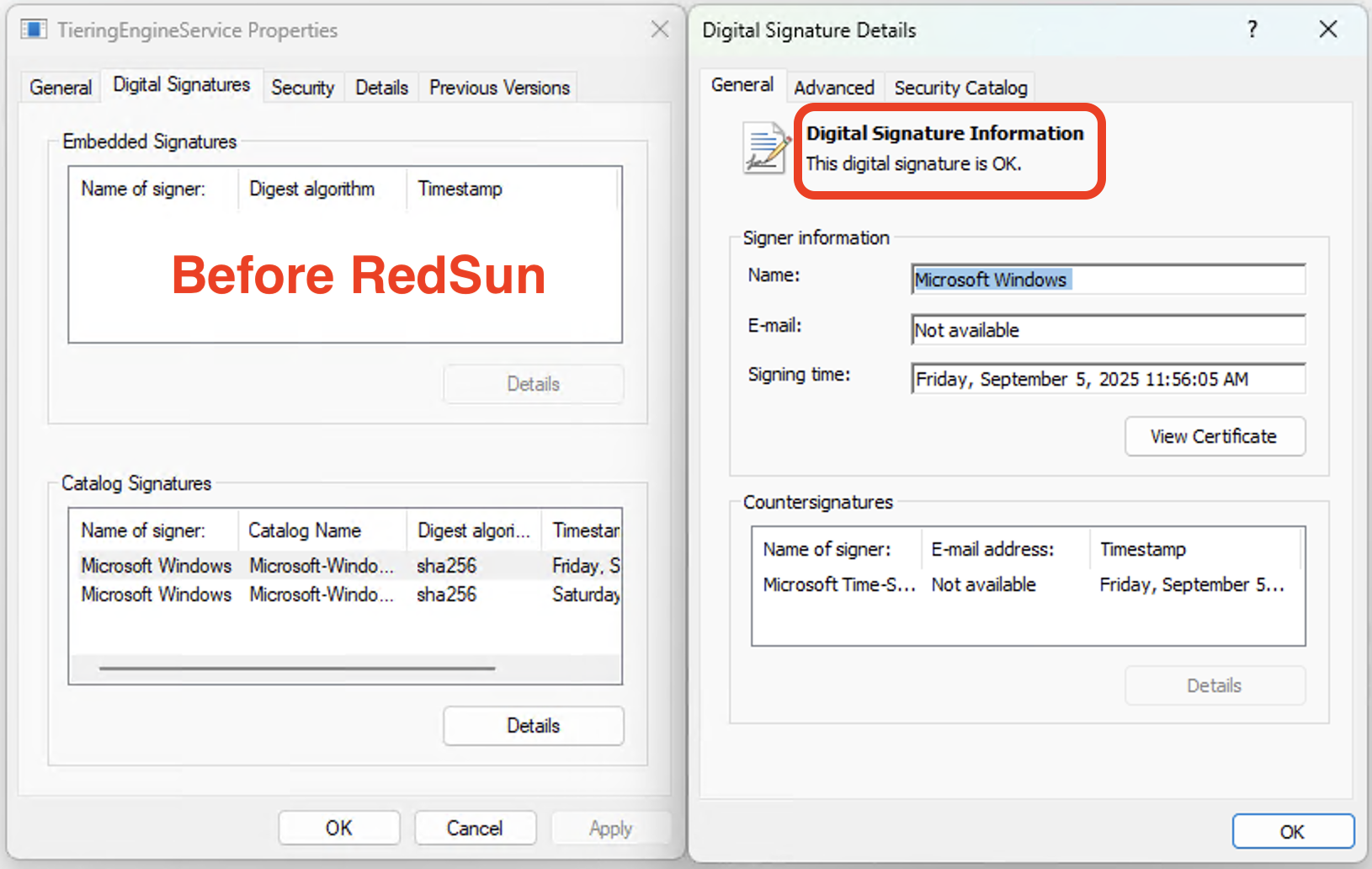
Just to be clear, before you attempted the exploit, your C:\Windows\system32\TieringEngineService.exe file had a valid signature?
 2
1
0
2
1
0
Jan Hendrik
jhr77@mastodon.social@wdormann @christopherkunz @GossiTheDog So this is even worse as this is persistent
1
0
0
Will Dormann
wdormann@infosec.exchange@jhr77 @christopherkunz @GossiTheDog
The exploit made no claims about being temporary.
0
1
0
Dr. Christopher Kunz
christopherkunz@chaos.social@wdormann @jhr77 @GossiTheDog Yeah, mine is unsigned, so I'm doing the whole dism & sfc routine now to presumably fix it.
I'm a little surprised though: Is this normal behavior that unsigned corrupted executables remain indefinitely in \system32 and aren't detected or removed? Is this something I would have to trigger manually, like an offline scan of sorts?
2
0
0
Will Dormann
wdormann@infosec.exchange@christopherkunz @jhr77 @GossiTheDog
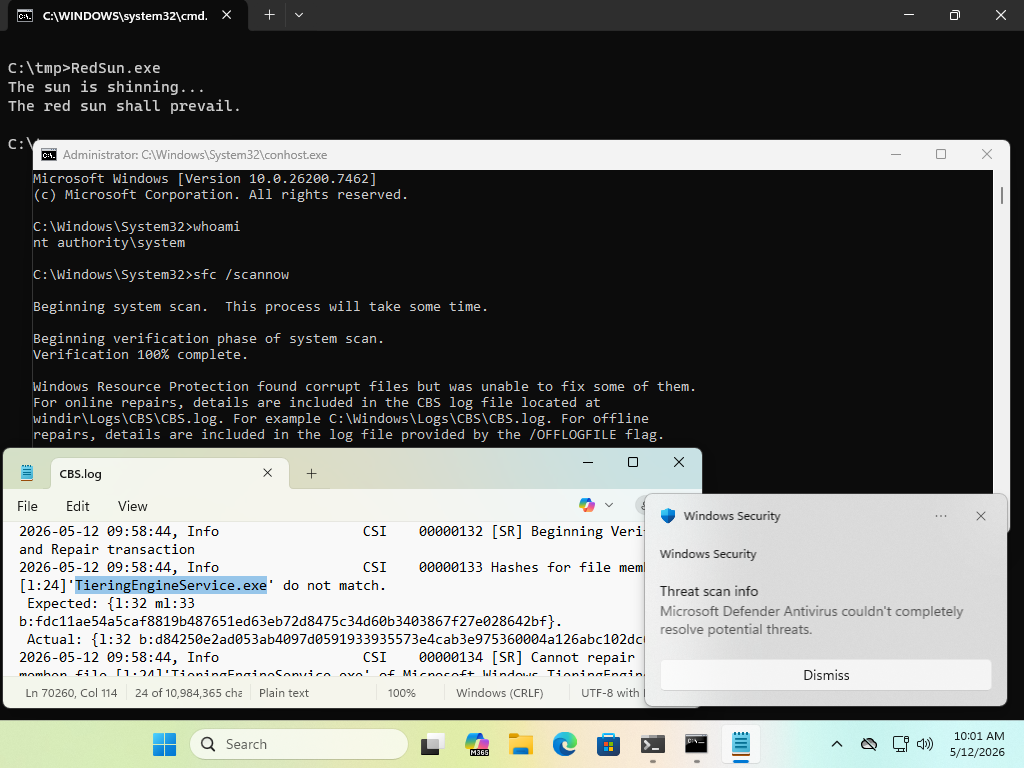
No, Windows does not do periodic filesystem checks to ensure that files have not been corrupted.
It's up to you to run sfc /scannow and associated tools if you think your Windows installation is corrupt.
 0
1
0
0
1
0
Jan Hendrik
jhr77@mastodon.social@christopherkunz @wdormann @GossiTheDog same same here. It's getting worse when asking more questions. But it was possible to replace with the original version. Hopefully the system is clean now. Maybe making a scan with the defender... 😅
1
0
0
Will Dormann
wdormann@infosec.exchange@jhr77 @christopherkunz @GossiTheDog
Always revert your VM to a clean state before (and after) testing an exploit. 😂
1
1
0
Dr. Christopher Kunz
christopherkunz@chaos.social@wdormann @jhr77 @GossiTheDog Meanwhile, slightly elsewhere: https://github.com/Nightmare-Eclipse/GreenPlasma
Looking forward to seeing the writeup to this.
https://github.com/Nightmare-Eclipse/YellowKey
1
0
0

buherator
buherator
1
0
2
Will Dormann
wdormann@infosec.exchange@buherator @christopherkunz @jhr77
I can't imagine why they'd wait for Patch Tuesday if they already have the path to fix it automatically at any time they want. 🤷♂️
1
1
0
buherator
buherator
1
0
2
Will Dormann
wdormann@infosec.exchange@buherator @christopherkunz @jhr77
Right. There is no official statement that the vulnerability was actually fixed.
I personally believe that it was fixed, as I can no longer reproduce the exploit with updated definitions.
I suspect that others in this thread do not agree with me.
Would be nice to have a definitive answer.
1
1
1
Will Dormann
wdormann@infosec.exchange@buherator @christopherkunz @jhr77
Related: In Microsoft's world, CVEs are identifiers for software updates released on Patch Tuesday (or OOB through the same channel), not vulnerabilities. They used to have proprietary identifiers for their software updates, like MS08-067, but when they switched to using CVEs, they didn't switch what the identifiers are for.
As such, I could imagine why they didn't think a CVE was necessary for the vulnerability that allowed the RedSun exploit to work.
1
1
0
Jan Hendrik
jhr77@mastodon.social@christopherkunz @wdormann @GossiTheDog What the h... is that yellowkey? I am a little bit afraid to try it. It sounds that it should be better prepared not on a windows system and tested on a completely separate pc.
1
0
0
Will Dormann
wdormann@infosec.exchange@jhr77 @christopherkunz @GossiTheDog
I've not been able to reproduce YellowKey in a VMware Workstation VM.
So either VMware is interfering with the hold CRTL and do NOT lift your finger off it apparently required part of the exploit, or it simply doesn't work.
Even if it did work, I suspect that it'd perhaps only work on systems that don't both with PIN-on-boot protection. Which is sort of known to be not terribly secure.
0
1
0
Will Dormann
wdormann@infosec.exchange@buherator @christopherkunz @jhr77
Also note that the RedSun author noticed that the vulnerability was fixed, without a CVE
Edit: The RedSun author is wrong. It still works fine
3
3
1
Jan Hendrik
jhr77@mastodon.social@wdormann @buherator @christopherkunz Today a bunch of updates have been done. But no time for testing...
0
0
0
Jan Hendrik
jhr77@mastodon.social@wdormann @buherator @christopherkunz But at least on a clean system the file "TieringEngineService.exe" has not been replaced 🤔
0
0
0
Dr. Christopher Kunz
christopherkunz@chaos.social@wdormann @buherator @jhr77 They had a whole bunch of LPE CVEs in the Cloud Files API, at least one race condition. I wouldn‘t be too surprised if they fixed it together with one of them.
1
0
0
Jan Hendrik
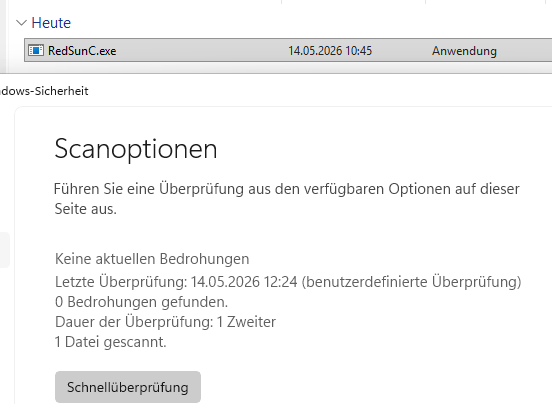
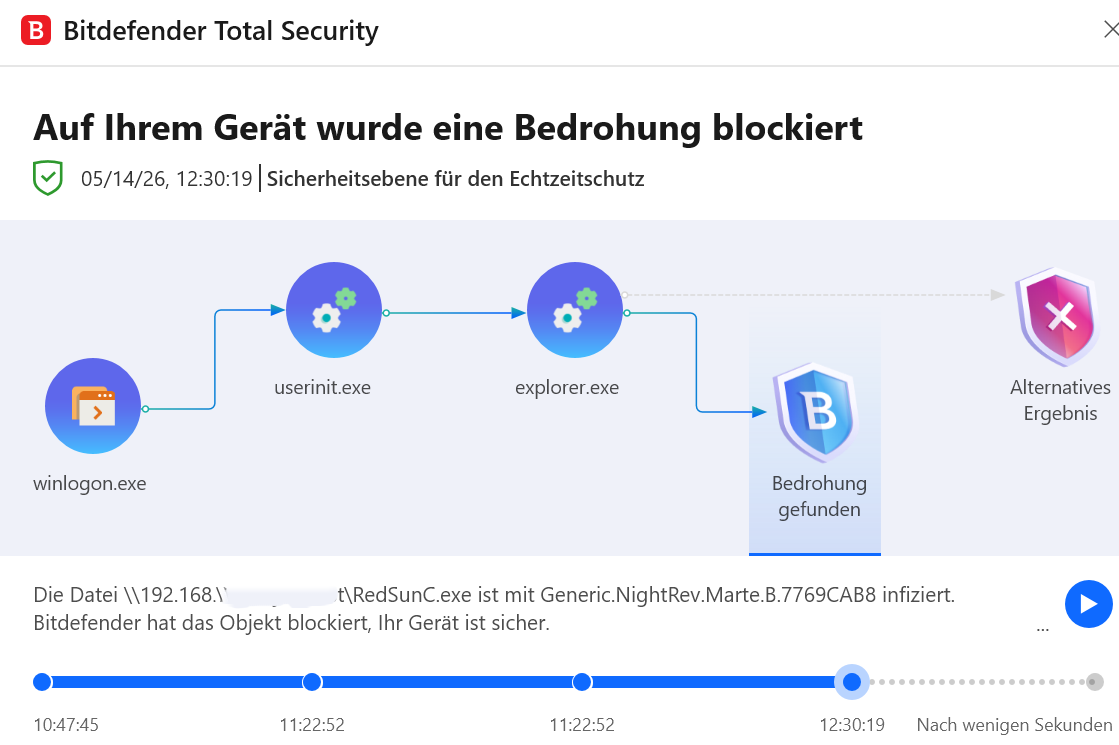
jhr77@mastodon.social@christopherkunz @wdormann @buherator Today it worked for me on a fresh system. Even if scanning the POC file. MS Defender still likes it...
b.t.w. Bitdefender is going mad when noticing the file
 1
0
0
1
0
0
Dr. Christopher Kunz
christopherkunz@chaos.social@jhr77 @wdormann @buherator A fresh VM with all updates and the latest definitions?
2
0
0
Jan Hendrik
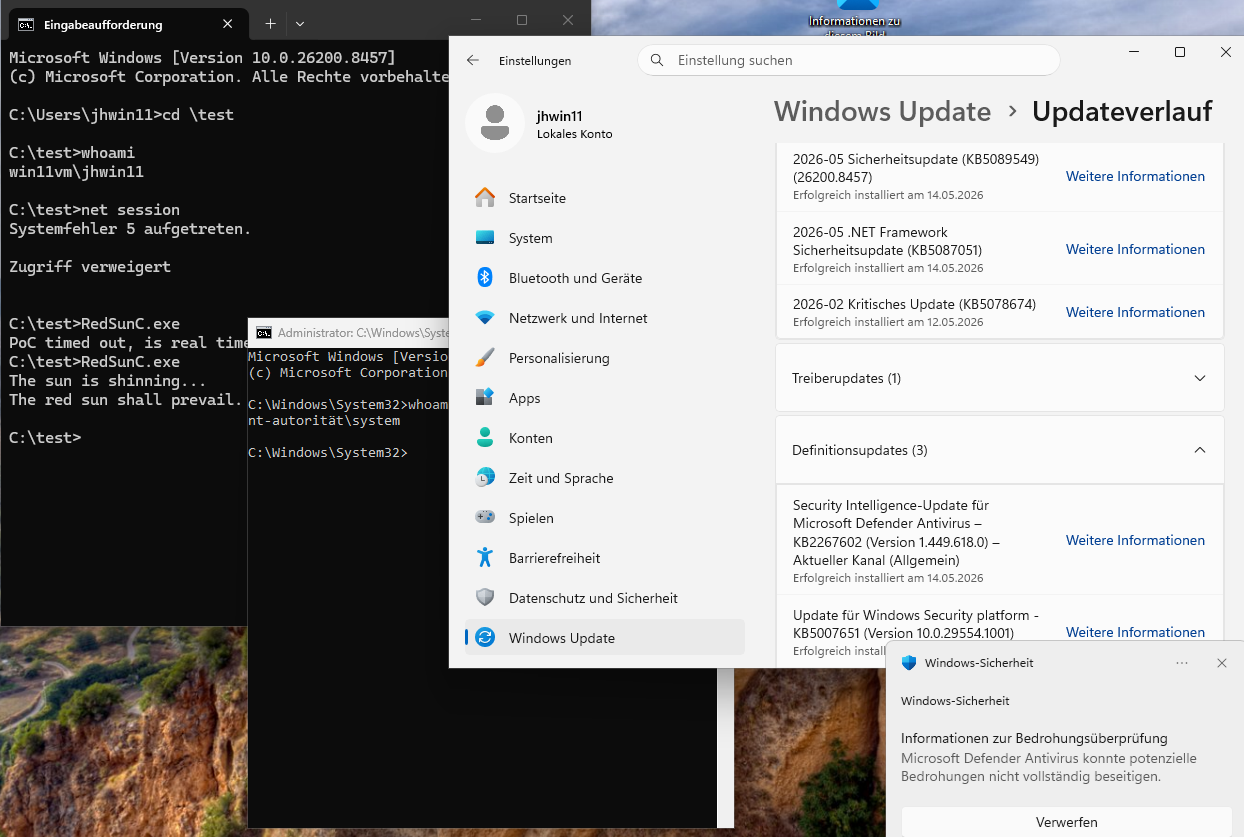
jhr77@mastodon.social@christopherkunz @wdormann @buherator Shame on me. Even if checking for all updates the KB5089549 hasn't been installed. So I will do so and try again. But I assume that it won't work any longer.
0
0
0
Jan Hendrik
jhr77@mastodon.social@christopherkunz @wdormann @buherator Here is the result. I must double check later. The first try failed, but the 2nd worked
 1
0
0
1
0
0
Will Dormann
wdormann@infosec.exchange@jhr77 @christopherkunz @buherator
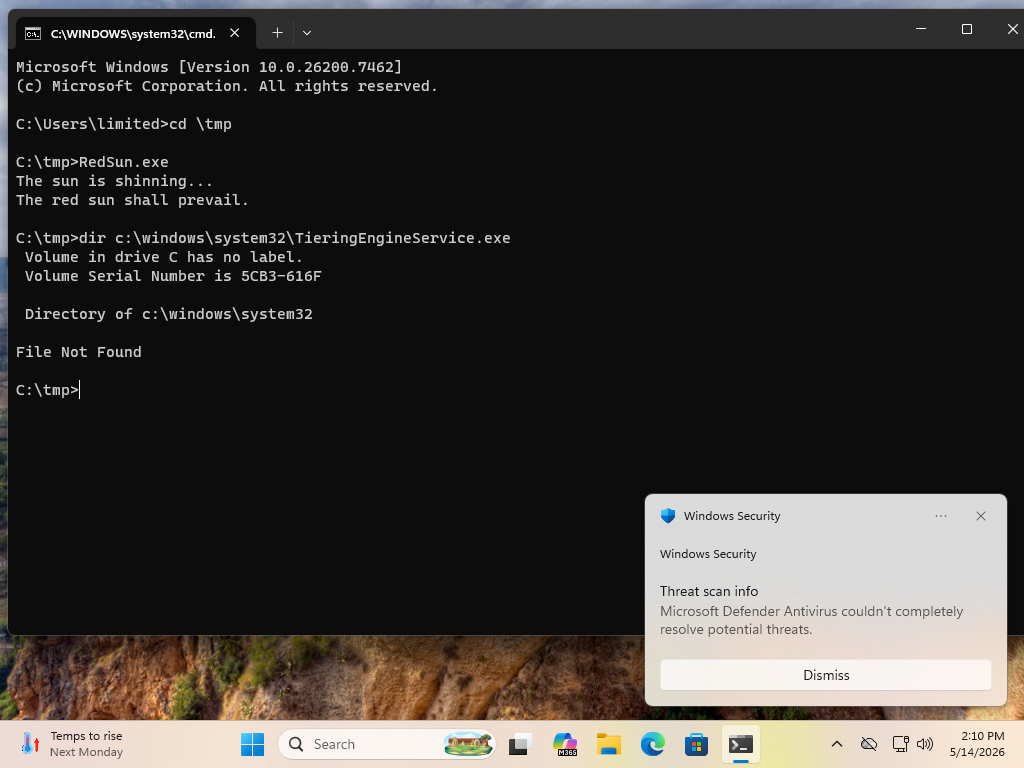
Ah, so this is fascinating.
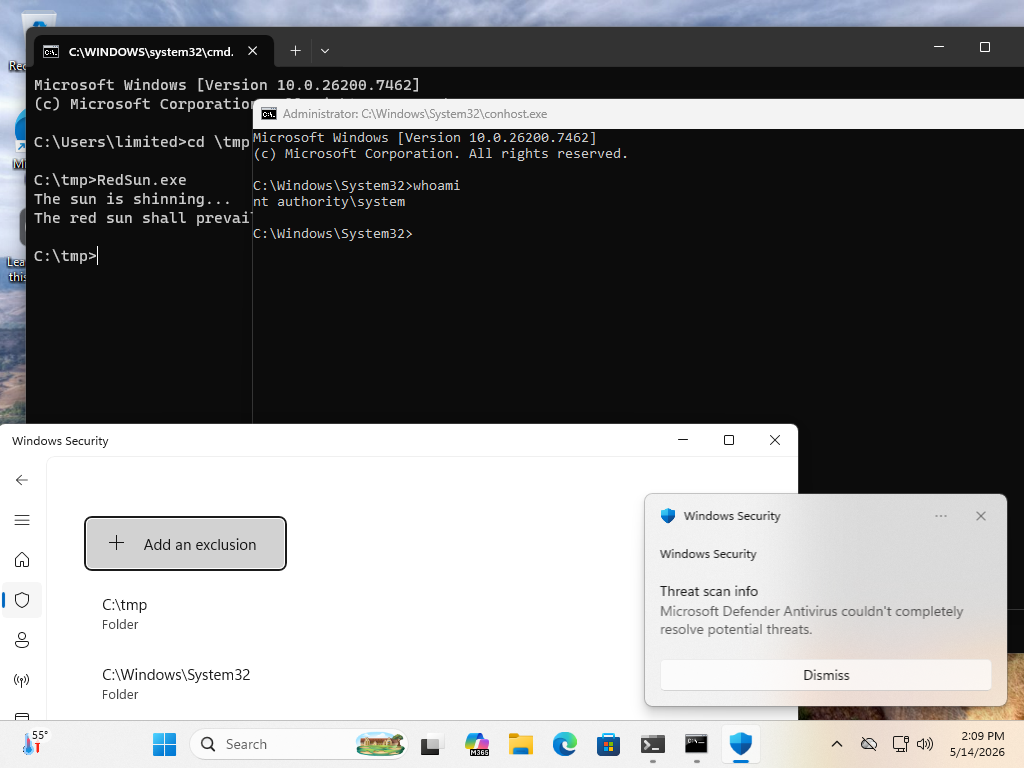
It appears that Microsoft did NOT address RedSun. They merely added a definition to discover the post-modified TieringEngineService.exe binary (which is the RedSun.exe file itself).
And if you aren't careful, like I wasn't, you might at a glance think that Microsoft broke the RedSun exploit. But that is wrong! They merely now detect the post-exploit-modified binary that RedSun chooses to modify. 🤦♂️
 1
4
0
1
4
0
Will Dormann
wdormann@infosec.exchange@jhr77 @christopherkunz @buherator
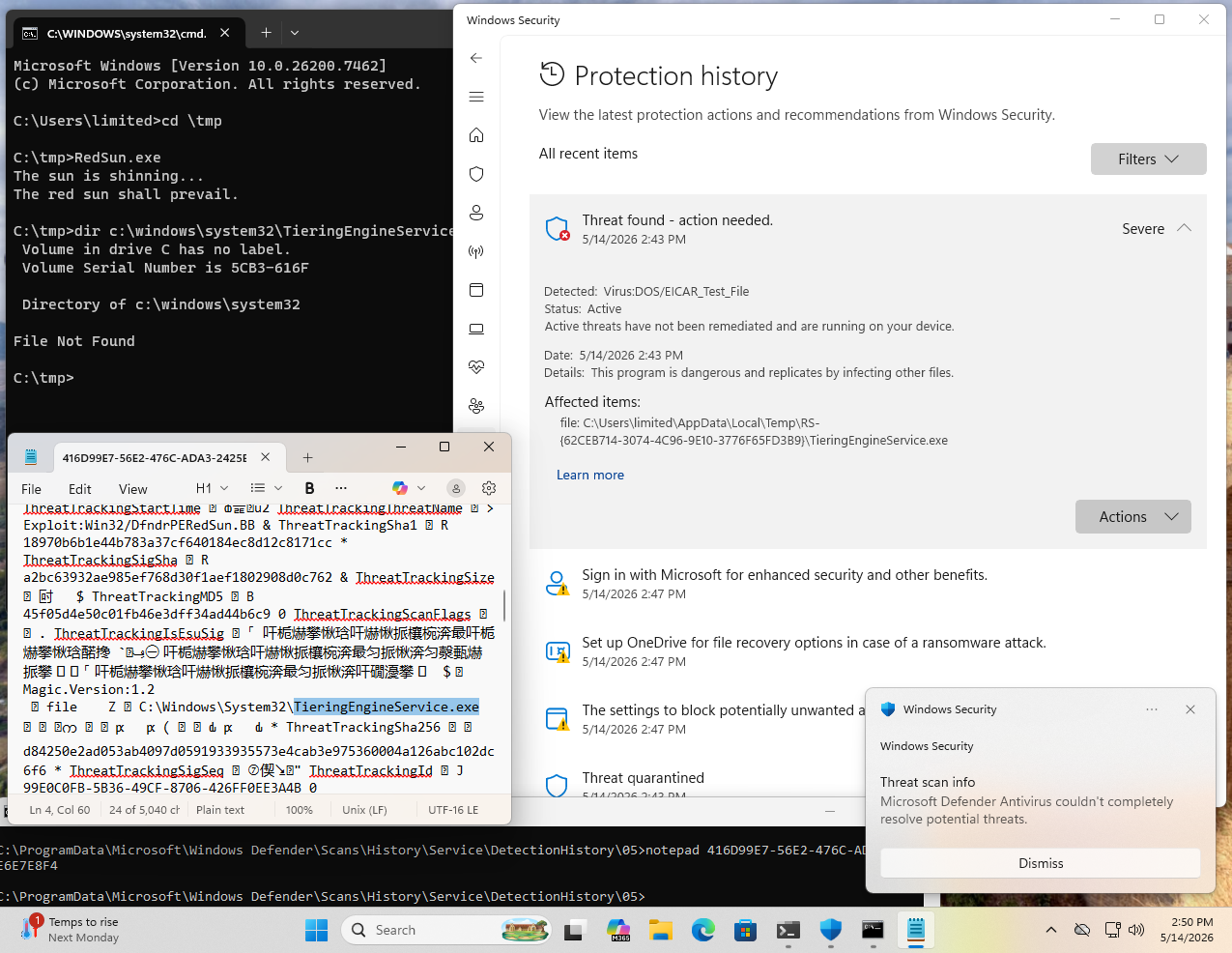
What's also interesting is that Defender doesn't actually admit that it deleted C:\Windows\System32\TieringEngineService.exe in its GUI.
But if we look in C:\ProgramData\Microsoft\Windows Defender\Scans\History\Service\DetectionHistory\, we can see evidence of the modified TieringEngineService.exe being detected. Its name and its SHA256 hash of d84250e2ad053ab4097d0591933935573e4cab3e975360004a126abc102dc6f6 is clear in this log file.
Perhaps your RedSunC.exe binary isn't detected by Defender, which is why you didn't have to go through the exclusions stuff I had to?
 1
1
0
1
1
0
Jan Hendrik
jhr77@mastodon.social@wdormann @christopherkunz @buherator That would be a cheap trick 😆 I used the different filename because the first project with the 'correct name' didn't work immediately and I was too lazy to delete. So this has been created 😅
The next try would be to play around with the array of the EICAR String which is actually 'only' reversed but in one piece.
1
0
0
Will Dormann
wdormann@infosec.exchange@jhr77 @christopherkunz @buherator
Yeah, I poked around with doing more clever things to hide EICAR, such as AES-encrypting the string without much luck.
I suspect that AV engines are detecting things other than the EICAR part of the exploit by now.
2
1
0
Jan Hendrik
jhr77@mastodon.social@wdormann @christopherkunz @buherator As far as I understood the source code and as seen in eventlog before. It is part of the exploit chain that the file is detected as "virus" at a certain time of execution.
1
0
0
Will Dormann
wdormann@infosec.exchange@jhr77 @christopherkunz @buherator
Indeed. It drops EICAR, which is instrumental to the exploit succeeding.
But in my testing, with updated Defender engines, the planted file in Windows\System32 also gets detected and deleted, where it did not in April. This breaks the exploit.
2
1
0
Jan Hendrik
jhr77@mastodon.social@wdormann @christopherkunz @buherator Today it needed 7 tries but finally it worked. Maybe due to system load?
My Hash ends with ...ADE9 and for the defender it's nit a threat. Even when scanning actively.
exe linked statically with different name...
Next try could also to target another service than TieringEngineService...
0
0
0
Dr. Christopher Kunz
christopherkunz@chaos.social@wdormann @jhr77 @buherator Last night, I ran the exploit successfully on my VM, but I suspect that the VM was not up to date _EVEN THOUGH_ it said so. It seems to be missing 26H1. That's why I held off posting my "success" here.
However, the VM had the latest Defender definition files and _still_ I popped an NT_AUTHORITY shell.
This was a fresh VM that did not run the exploit before.
0
0
0
Jan Hendrik
jhr77@mastodon.social@wdormann @christopherkunz @buherator I played around a little bit and modified to replace WmiApSrv.exe which suceeds. Now even Bitdefender doesn't recognize the file. But it's still not working because the service dlesn't properly start. Maybe it will be possible to spawn a shell...
Further my feeling is that it's working better directly after login.
0
0
0